
Last updated on
Oct 31, 2026
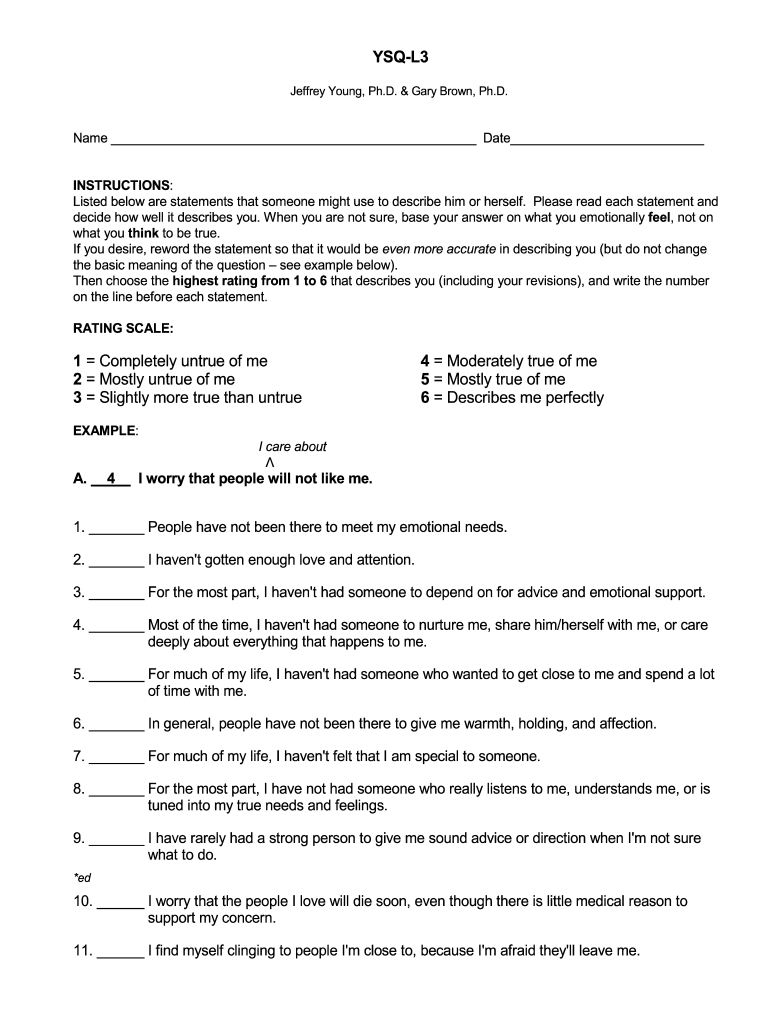
YSQ-L3 free printable template
We are not affiliated with any brand or entity on this form

Fill out
Complete the form online in a simple drag-and-drop editor.

eSign
Add your legally binding signature or send the form for signing.

Share
Share the form via a link, letting anyone fill it out from any device.

Export
Download, print, email, or move the form to your cloud storage.
Why pdfFiller is the best tool for your documents and forms


End-to-end document management
From editing and signing to collaboration and tracking, pdfFiller has everything you need to get your documents done quickly and efficiently.
Accessible from anywhere
pdfFiller is fully cloud-based. This means you can edit, sign, and share documents from anywhere using your computer, smartphone, or tablet.
Secure and compliant
pdfFiller lets you securely manage documents following global laws like ESIGN, CCPA, and GDPR. It's also HIPAA and SOC 2 compliant.
What is YSQ-L3
The YSQ-L3 is a specialized document used by designated entities to process specific requirements efficiently.
pdfFiller scores top ratings on review platforms




Thank you
This has made life so much easier when writing documents and upholding confidentiality. Excellent!!!
Customer focused with good features
I find Pdffiller to be one of the better online services of its type. As well as having many features in a fairly easy to use interface, their support is responsive and very customer focused. They offer a full feature short trial (requires credit card details, which some people may find off putting). It's straightforward to cancel. If you're looking to pay for an ongoing service, I recommend pdffiller.
Who needs YSQ-L3?
Explore how professionals across industries use pdfFiller.

YSQ-L3 is needed by:
-
Individuals seeking regulatory compliance
-
Businesses managing administrative tasks
-
Legal professionals handling documentation
-
Non-profit organizations pursuing specific filings
-
Government agencies requiring specific information
Comprehensive Guide to YSQ-L3
What is the YSQ-L3?
The YSQ-L3 form serves a crucial function in tax reporting and compliance. Designed to collect specific financial data, it aids in ensuring proper documentation for authorities. Understanding the YSQ-L3 is essential for those who must report their income accurately and adhere to tax regulations.
This form is particularly relevant for users who meet specific criteria, including businesses and individuals involved in particular financial activities.
Purpose and Benefits of the YSQ-L3
The primary objective of filing the YSQ-L3 is to ensure accurate tax reporting, significantly reducing the risk of penalties associated with misreporting or non-compliance. Completing the YSQ-L3 correctly not only avoids fines but also helps maintain good standing with tax authorities.
Users benefit from enhanced clarity regarding their tax situation and the assurance that they are fulfilling their legal obligations.
Who Needs to Fill Out the YSQ-L3?
The YSQ-L3 must be completed by various categories of individuals and entities. This includes self-employed individuals, corporations, and other legal entities that meet certain income thresholds or regulatory requirements.
-
Self-employed individuals reporting specific income types
-
Corporations mandated to report certain financial metrics
-
Partnerships or entities with multi-member income
Understanding who is required to submit the YSQ-L3 is vital for ensuring compliance with applicable laws.
Eligibility Criteria for the YSQ-L3
To file the YSQ-L3 form, users must meet specific eligibility criteria. This includes having the requisite income levels and operational status as defined by tax regulations.
-
Individuals and entities with income exceeding defined thresholds
-
Businesses operating under specific tax classifications
-
Exceptions may apply based on unique circumstances, such as type of income or corporate status
Clarifying these criteria helps ensure that only qualified users proceed with the filing process.
How to Fill Out the YSQ-L3 Online (Step-by-Step)
Filling out the YSQ-L3 online can be straightforward if followed properly. Here is a step-by-step guide to assist users:
-
Access the YSQ-L3 form via a secure platform.
-
Fill in personal or business identification details in the designated fields.
-
Accurately report all necessary income information.
-
Review each section carefully to avoid missing critical data.
-
Submit the form electronically through the provided options.
Pay special attention to key fields and avoid common pitfalls to enhance the accuracy of your submission.
Common Errors and How to Avoid Them
Users may encounter typical errors when completing the YSQ-L3, which can lead to issues in submission. Common mistakes include:
-
Inaccurate or missing identification information
-
Errors in reporting total income
-
Neglecting to verify the form before submission
To avoid these mistakes, it is advisable to review the completed form thoroughly and consult relevant resources if unsure.
Submission Methods for the YSQ-L3
The YSQ-L3 can be submitted through various methods, providing users with flexibility in how they file. Options include:
-
Online submission via a secure platform
-
Mailing the completed form to the appropriate authority
-
In-person submission at designated locations
Additionally, users should be aware of any fees associated with submission and ensure that all required documentation is included.
What Happens After You Submit the YSQ-L3
After submitting the YSQ-L3 form, users can expect a processing timeline that varies based on the submission method. Following up on the submission is important for tracking the application's status.
-
Allow time for processing before attempting to check the status.
-
Keep any confirmation receipts related to the submission.
Being proactive can help users address any potential issues that arise post-submission.
Security and Compliance for the YSQ-L3
Security is paramount when handling the YSQ-L3, given the sensitive nature of the information involved. Users can trust pdfFiller's robust security measures, including 256-bit encryption.
Additionally, pdfFiller is compliant with regulations such as GDPR and HIPAA, ensuring that users' data remains secure throughout the process.
Effortlessly Complete the YSQ-L3 with pdfFiller
Using pdfFiller simplifies the process of completing the YSQ-L3. The platform offers several advantages, such as:
-
Easy editing and customization of the form
-
Convenient eSigning features for quick approval
-
Efficient sharing options for collaboration
Utilizing pdfFiller ensures users experience a streamlined form-filling process with added security.
How to fill out the YSQ-L3
-
1.Begin by accessing pdfFiller in your web browser. Search for 'YSQ-L3' in the template library.
-
2.Once you find the YSQ-L3 form, click to open it in the pdfFiller interface. Familiarize yourself with the features on the sidebar.
-
3.Review the form fields and gather all necessary information before starting. Check for any requirements or documents that need to be included.
-
4.Begin filling out required fields, ensuring that all entries are accurate. Use the text tool to add your information into the designated areas.
-
5.After completing all sections, utilize the zoom feature to review the filled information clearly. Ensure there are no missing entries or errors.
-
6.Once you are satisfied with the information entered, click on the 'Finish' button to finalize your form for submission.
-
7.You can choose to save the completed form to your computer by clicking on the download option or submit it directly through pdfFiller if applicable.

Who is eligible to fill out the YSQ-L3 form?
Eligibility for the YSQ-L3 form generally includes individuals or entities needing to meet specific regulatory requirements. Ensure you meet any relevant guidelines before submission.
What is the deadline for submitting the YSQ-L3 form?
Deadlines may vary based on the purpose of the YSQ-L3. It's recommended to check related guidelines or instructions for any specific dates or time-sensitive information.
How can I submit the YSQ-L3 form?
You can submit the YSQ-L3 form directly through pdfFiller if it supports online submissions or download it and send it via traditional mail depending on your requirements.
Are there any supporting documents required with the YSQ-L3 form?
Review the specific requirements for the YSQ-L3. Generally, supporting documents may be necessary, such as identification or proof of compliance.
What common mistakes should I avoid when filling the YSQ-L3 form?
Common mistakes include overlooking required fields, entering inaccurate information, or submitting before reviewing. Always double-check your entries before submission.
What are the processing times for the YSQ-L3 form?
Processing times for the YSQ-L3 form can depend on the reviewing entity’s schedule. Typically, expect a few weeks but verify with specific guidelines for accuracy.
What if I encounter issues while filling out the YSQ-L3 form on pdfFiller?
If you experience issues, consult the help resources on pdfFiller for troubleshooting. They offer guidance, or you can reach out to their support team for assistance.
Related Forms




Related Catalogs
Get the latest insights from our blog


If you believe that this page should be taken down, please follow our DMCA take down process
here
.
This form may include fields for payment information. Data entered in these fields is not covered by PCI DSS compliance.